


Beli
4.2226.00 Reviews
App Specs
- Version
- 9.14.1
- Updated On
- License
- Free
- Downloads
- 100,000+
- Developer
- Beli App
- Categories
- Food & Drink
- Platform
- Android
Screenshots
 Analysis by AppCompare
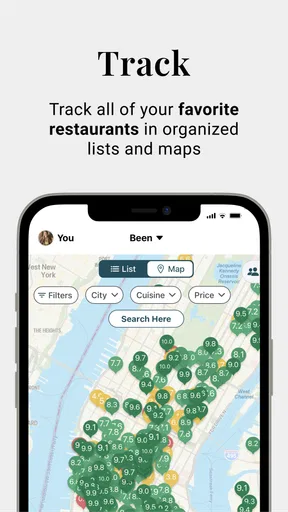
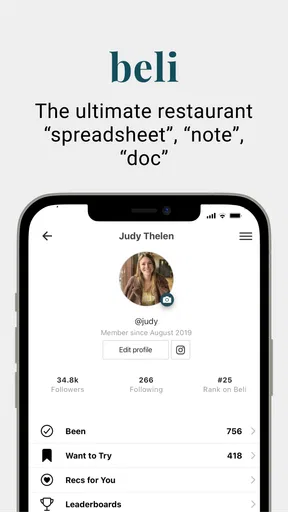
When I choose a place to eat, the hard part often isn’t finding options; it’s remembering which ones I actually liked. Beli is built around that personal decision: it gives you a place to keep track of restaurants and rank your favorites, rather than turning the search into another endless list of nearby results. I find that useful when a recommendation comes up and I want to remember whether it was genuinely good for me, not just popular with everyone else.
That focus makes Beli a different kind of food and drink app from a map or a delivery service. I’d reach for a map to find what is open nearby, and for a delivery app to place an order. Beli makes more sense as a personal reference: a record of places I’ve tried, a way to compare them, and a prompt for choosing where to go next. It’s free, developed by Beli App, and suitable for everyone. Its 4.0 average from around 1,600 ratings suggests a well-used app with room for individual tastes to differ.
A routine that makes the rankings useful
The simplest way to get value from a restaurant-ranking app is to make a small habit of using it after a meal, while the details are still fresh. I’d add or rank a restaurant soon after visiting rather than trying to reconstruct months of meals in one sitting. A quick note to myself about what stood out—such as a dish, the atmosphere, or whether I would return for a casual lunch—can make a ranking easier to interpret later. The point is not to create a perfect food diary; it’s to make future choices less dependent on a fading memory.
For example, imagine a friend asks for a dinner suggestion on the way home from work. Instead of scrolling through old messages or searching from scratch, I can look at places I’ve already tried and compare them with the kind of evening we want. A favorite for a relaxed meal may not be the right pick for a quick bite, so I’d treat my ranking as a personal shortlist, not an automatic answer. That distinction is one of the most useful habits to build: a high rank tells me what I enjoyed, while the occasion still determines what I recommend.
Make the list reflect your taste
Rankings are most helpful when I use them consistently. If I compare a new visit with a few places I know well, my list can become a practical guide rather than a collection of disconnected scores. I would avoid trying to judge every restaurant against an abstract standard. Instead, I’d ask a simple question: which place would I choose again, given a similar mood, budget, and occasion? That keeps the system personal and makes comparisons more actionable.
There is also a trade-off in ranking restaurants at all. A single overall position can flatten the details: I may love one place for its food and another for its setting, yet need to choose between them in one ordered list. If I notice myself hesitating, I’d use any available notes or my own memory to preserve the reason behind a rating. That little bit of context matters more than nudging a restaurant up or down by one spot.
Where it fits among restaurant tools
Unlike a general map, Beli is centered on my own restaurant preferences rather than simply helping me locate a business. Unlike review platforms where public ratings and written opinions can dominate the decision, a personal ranking is easier to tailor to what I enjoy. That can be a strength when I have already tried a place and want to compare it with my regulars. It is less helpful when I need current opening hours, directions, a menu, or a broad set of recent opinions; for those jobs, I’d use a dedicated map or review service alongside it.
Worth Reading Before You Choose

EA SPORTS FC Mobile 26 Is a Bigger Football Game, but It Takes Time

Flipboard Shows What News Apps Must Do Beyond the Feed

Switching to Android Auto Means Rethinking Your Driving Routine

Google Calendar Makes a Crowded Week Easier to Manage

Ludo King Makes the Most of the Minutes Between Plans

Baby Panda World Brings Quick Play to Modern Phones, but Its Game Library Feels Busy
I’d especially recommend this approach to people who eat out often, like revisiting favorites, or regularly get asked for local suggestions. It can also help someone settling into a new neighborhood build a considered list over time, rather than relying on the first few search results. On the other hand, if you rarely visit restaurants, prefer to choose spontaneously from whatever is closest, or don’t enjoy maintaining a personal ranking, the extra record-keeping may feel like work. The app is most useful when your own past experiences are worth consulting.
Small habits for quicker decisions
A few repeatable habits can keep the list useful without turning every meal into an assignment. I’d record a visit while discussing it with whoever came along, capture the detail that will matter next time, and use the ranking when planning rather than only when I’m already hungry and rushed. If I’m choosing for a group, I’d first narrow the options to places I know, then check that the choice suits everyone’s plans. A personal favorite is a starting point, not proof that it will fit every companion.
It also helps to keep separate occasions in mind when interpreting the order. A restaurant I’d happily revisit for a special meal might not be my choice for a quick weekday lunch. Rather than expecting one ranking to answer every question, I’d treat it as a memory aid and make the final call based on the present need. That approach avoids the common trap of letting a list make the decision more complicated than it needs to be.
What to expect as your list grows
A personal ranking becomes more useful with repeated visits and thoughtful comparisons, but it can also become harder to maintain if I try to record every meal. I’d start with places I genuinely want to remember, then add others as they become relevant. This keeps the list focused and avoids spending time documenting a routine takeaway or a one-off stop I’m unlikely to revisit. There’s no need to turn restaurant discovery into admin for the app to earn its place.
One question readers may have is whether Beli replaces the usual search tools. I wouldn’t treat it as a replacement for maps, menus, or public reviews. Its value is strongest in the personal layer: keeping my own choices organized and helping me recall what I thought. Another reasonable question is whether it suits someone who mostly eats at home. In that case, it may not become part of a regular routine; its appeal depends on having restaurants you want to compare or recommend.
If you’re wondering how to get a useful start, I’d add a handful of places you already know rather than trying to build a complete history at once. Then, after a new visit, make one considered comparison and move on. That gives you a reference point without requiring a big setup session. The practical payoff is a list that reflects your taste, not an exhaustive catalogue of every meal you have ever had.
Tracking Finances Made Easy
Alright, let's talk about what Beli really does for you. It's essentially your personal finance assistant, and trust me, it does the job well. Straight off the bat, the first thing you'll notice is how clean and intuitive the interface is. No more squinting at tiny numbers or getting lost in a sea of options. Everything is laid out nicely, making navigation a breeze.
From tracking your daily expenses to keeping an eye on your monthly budget, Beli has you covered. You can easily categorize expenses, which is super handy if you're like me and need to know exactly where every penny is going. Eating out too much? You'll know. Spending too much on coffee? Guilty as charged.
Setting Up Budgets
Now, setting up budgets can often feel like a chore, but Beli makes it surprisingly painless. You just set your limits, and the app will gently remind you if you're getting close to overspending. It's like having a little financial guardian angel looking out for your wallet. Plus, there's a satisfaction in seeing those green bars of progress each month.
One feature I particularly love is the ability to plan for future expenses. Got a trip coming up? Or maybe you’re saving for that new gadget? You can set goals and track how close you are to reaching them. It’s motivating, and seeing your progress in real-time feels rewarding.
Security and Syncing
I know what you’re thinking—security. It's a big deal, right? Beli takes this seriously with bank-level encryption, so you can rest easy knowing your data is safe. Plus, it syncs seamlessly across devices, which means you can check your finances on the go, whether you're on your phone or tablet.
And, if you’re managing finances with a partner, the app also supports sharing features. This makes coordinating expenses a lot simpler, and let's face it, fewer arguments over money is always a good thing.
Insights and Reports
Another cool thing about Beli is its ability to generate detailed reports. You can get insights into your spending habits over weeks or months, which is perfect for spotting patterns or areas where you can cut back. It’s like having a financial advisor, minus the hefty fees.
The reports are visually appealing and easy to understand, which is a huge plus. No more staring blankly at spreadsheets; instead, you get pie charts and graphs that actually make sense.
Getting Started
If you’re ready to take control of your finances, getting started with Beli is a breeze. Just download the app from the Google Play Store or the Apple App Store, and you’re good to go. The setup process is straightforward, and within minutes you'll be on your way to becoming financially savvy.
So, if you’re looking for a tool to help you manage your money better, give Beli a shot. It's user-friendly, secure, and quite frankly, a bit of a lifesaver. Happy budgeting!
Pros
- User-friendly interface enhances navigation.
- Supports multiple payment methods securely.
- Offers attractive discounts and rewards.
- Fast and reliable customer support.
- Efficient order tracking system.
Cons
- Limited product categories available.
- Occasional app crashes during checkout.
- Some items have long delivery times.
- Infrequent updates cause minor bugs.
- No customization options for notifications.
FAQs for Beli
What is Beli and how does it work?
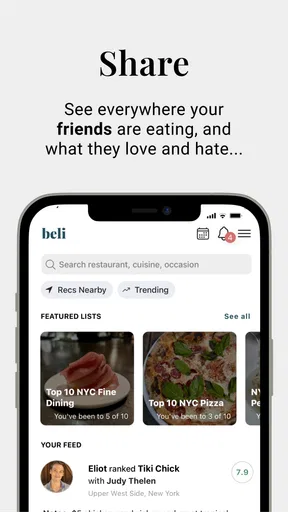
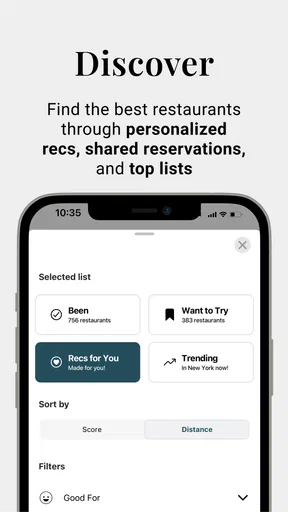
Beli is a social app designed to enhance your dining experiences by connecting you with friends and food enthusiasts. It allows you to discover new restaurants, share your reviews, and see recommendations from your network. It works by leveraging location data and user reviews to suggest dining spots that match your preferences.
Is Beli available for both Android and iOS devices?
Yes, Beli is available for download on both Android and iOS platforms. You can easily find it on Google Play Store for Android devices and the Apple App Store for iOS devices. Ensure your device meets the app’s minimum system requirements for a smooth experience.
Does Beli require an internet connection to function?
Yes, Beli requires an internet connection to provide real-time updates, access restaurant reviews, and connect with friends. While some features may be accessible offline, such as viewing saved places, a connection is essential for the full experience, including updating your activity feed and exploring new recommendations.
How does Beli ensure the privacy of its users?
Beli is committed to user privacy and employs robust security measures to protect personal data. Users can control their privacy settings to manage who sees their activity and reviews. Additionally, Beli adheres to strict privacy policies, ensuring data is not shared with third parties without consent.
Are there any in-app purchases or subscription fees?
Beli is free to download and use, but it may offer optional in-app purchases for enhanced features or premium content. These purchases are not necessary for basic functionality, allowing users to enjoy the core features at no cost. Always check for any updates regarding fees in the app’s details.


